

Export a table to an external file
Use this to export a table to a comma separated (CSV) external file.
At the User tables screen:-
● Select the table required
● Select: File - Export
or
 Right click - Export
The program prompts for the location to save the table to.
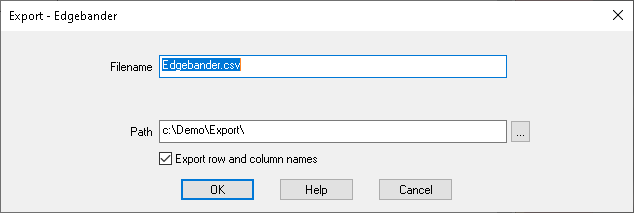
● Enter the file name and the path
By default the export is to the directory set by the System parameter: Path for export data
 Use the list
box to select a different path
Use the list
box to select a different path
Export row and column name - Check this box to include the first row and first column in the data. These are the identifiers at the start of each row and top of each column.
● OK to finish
Other options
Help - information about this dialog
Cancel - abandon print
Notes
- The program prompts to replace the file if a file of that name already exists
- Example of an export file
*,1200,800,400
Office 1,OAK-18MM,OAK18MM,OAK-18MM
Office 2,TEAK-18MM,TEAK-18MM,OAK-18MM
Home 1,TEAK-15MM,TEAK-15MM,TEAK-15MM
Leisure,MDF-18MM,MDF-18MM,MDF-15MM
