

Machining option to divide a groove rout
It is sometimes useful to split an exiting groove rout into two rout instructions. To do this:-
● Move to a drawing and select the required groove instruction
 Right click with
mouse to show a pop up menu
Right click with
mouse to show a pop up menu
● Select the 'Split' option
The program displays a small dialog.
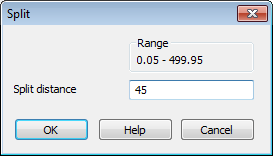
● Enter the split distance
The 'split distance' is the distance from one end of the line to the dividing point. (The range shows the possible values)
● Select OK to confirm
The instruction is split into two separate groove routs
Notes
- Each part of the split has the same properties and values (apart from start/end) as the original rout
- Within a contour the start and end elements of the passes are adjusted to match the split
- Does not apply for Saw rout, arc rout, any rout with a repeat instruction
