

Change all sizes in a column in a part list by a fixed amount
It is sometimes useful to apply a small adjustment to all sizes in a list, for example, to improve imported data or correct an error. At the Part list / Cutting list screen:-
● Select: Optimise - Adjust sizes
The program displays the 'Adjust sizes' dialog
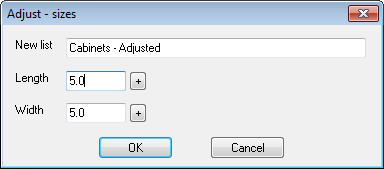
Length, Width - enter the fixed amount of the adjustment. There are separate entries for the length and the width columns. Toggle the small button at the right of each box for a plus or minus adjustment.
New list - enter a part list name for storing the changed list. The default is the name of the current list so the default action is to overwrite the current list.
● Select OK to confirm
Other options
Cancel - abandon adjustment (no changes are made)
