

Optimising parameter to force the order in which parts are used
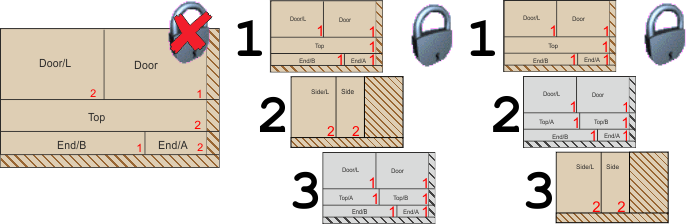
There are three values for this parameter
No strict priority
Priority for parts is followed but not strictly but higher priority parts will always be finished before lower priority ones.
Where priorities are set for each part (to determine the order in which parts are used in patterns) the program can be set to follow the priority exactly. To do this, set the strict priority to either ‘Per material’ or ‘Across materials’.
Each cutting pattern is filled with parts of one priority at a time. Parts from the next priority cannot be used until all parts of the current priority have been fitted. This means the parts of a given priority are all cut on a small number of adjacent patterns.
Strict priority per material
Parts are optimised in priority order for each material. The final set of patterns are grouped by material and the strict priority applies for each material group of patterns.
e.g.
Pattern 1 – Material A, Priority 001
Pattern 2 – Material A, Priority 002
Pattern 3 – Material B, Priority 001
Pattern 4 – Material B, Priority 002
Strict priority across materials
Parts are optimised in priority order across all materials and the final set of patterns are in mixed material order so that the strict priority is obeyed across all patterns
e.g.
Pattern 1 – Material A, Priority 001
Pattern 2 – Material B, Priority 001
Pattern 3 – Material A, Priority 002
Pattern 4 – Material B, Priority 002
See the topics: Extra open parts for single cycle patterns |
Notes
- The action of the setting can be made less strict by assigning the same priority to different cabinets, for example, to produce two cabinets to be spread across a minimum number of sheets.
- When working with Pallet groups parts in the same pallet group must have the same priority and it is best to set the value to 'Strict priority'.
- Strict priority is not observed by the 'Medium quantity optimiser (II)'.

|