

Reactivate Cloud Licence Utility
In the event that the Magi-Cut Cloud Licencing Server becomes unavailable for an extended period of time, a utility program can be used to temporarily re-activate a cloud licence for 30 days.
If the licencing server becomes unavailable and you are still logged into the licence it will enter a 10 day grace period, the program reports warnings for up to 10 days, a countdown will indicate when the licence will expire (as below example).
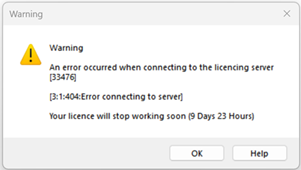
You should continue to use the software normally during this time. Connection to the Cloud Licencing Server will most likely be restored during the grace period in which case no further action is required.
However should the countdown expire or you attempt to login to a signed out licence while the Cloud Licencing Server remains unavailable, you will need to follow the reactivation process.
Re-activation process
To temporarily re-activate your cloud licence, download the ReactivateCloudLicence.exe from the below download link, run it and follow the instructions on screen. The program verifies that the PC has a working internet connection and a cloud licence which can be re-activated. Selecting Y begins the activation attempt. If successful, the program reports: Licence has been successfully re-activated.
Resuming normal operation
When running with a licence which has been extended by the utility, the program periodically checks whether the licencing server is available again. If the seat has not been allocated to a different user, the licence is refreshed automatically. Otherwise, the log in dialog is displayed.